
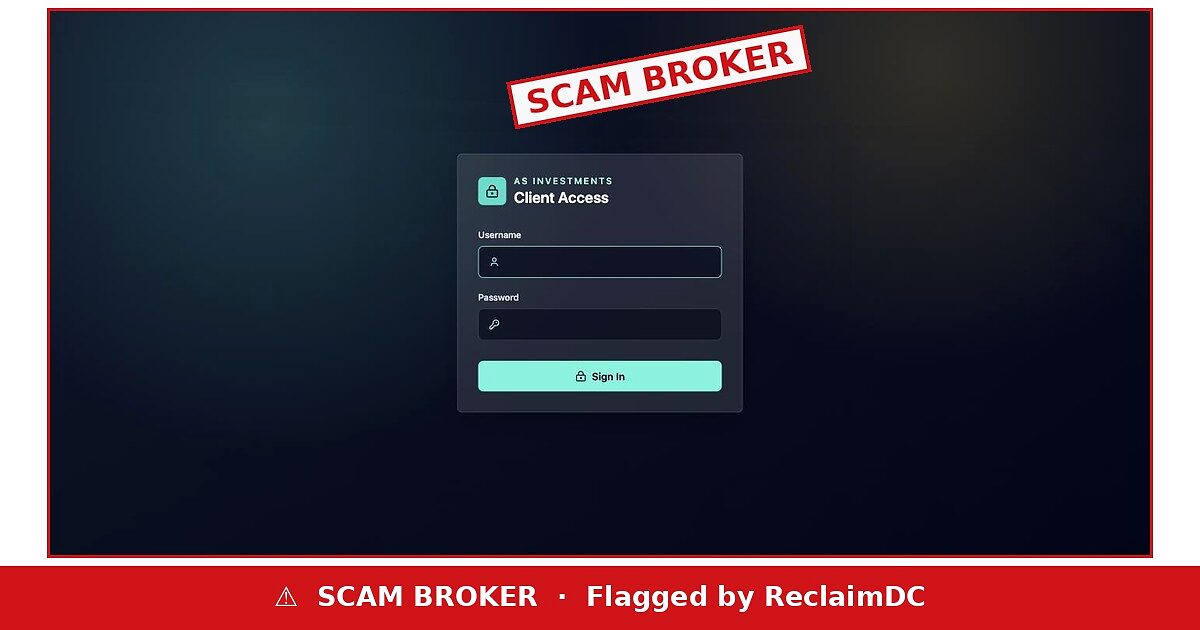
AS Investments (as-investment.com) consists of one screen: “AS INVESTMENTS — Client Access”, with fields for a username and password. The Dutch regulator, the AFM, warned about “AS Investments Funds” on 18 June 2026. The domain was registered on 31 March 2025.
AS Investments
as-investment.com
SCAM BROKER
- Website
- as-investment.com
- What loads
- “Client Access” login only
- Name in warning
- AS Investments Funds
- Company, licence, address
- None shown
- Warning
- AFM (Netherlands), 18 June 2026
- Domain registered
- 31 March 2025 — about 18 months old
Nothing to read, only a password box
A legitimate fund manager publishes who it is, what it manages and who supervises it. AS Investments publishes a login form. The only people who reach it are those sent the link by a salesperson — and once inside, the dashboard shows whatever the operator chooses.
Why scammers use dashboards
Login-only portals let operators display rising balances and paper profits that encourage larger deposits. When a client asks to withdraw, the same dashboard starts showing taxes, fees or “verification” charges.
⚠ Verified evidence
- AFM warning about AS Investments Funds, 18 June 2026.
- Site is a login box only.
- No company, licence or address.
- Domain registered 31 March 2025.
Did AS Investments cost you money or time?
Tell us what happened on our short complaint form — it goes straight to our support team, nothing to download, and we reply personally.
✎ File a complaint about AS Investments
Include the website, the dates, the amounts and how you paid. Screenshots help.
‘Funds’ without a fund
The AFM names the operation AS Investments Funds. A real investment fund in the Netherlands needs an AFM licence or a European passport. The regulator’s warning says this one has neither.
If you have an account
If you were given login details for this site, stop depositing. Do not pay any fee to release money, and do not trust anyone who later contacts you offering to recover it for a charge.
Paid AS Investments — your next steps
- Do not pay any “tax”, “unlock” or “verification” fee AS Investments asks for — those charges never release a balance.
- Ignore cold calls promising to get your AS Investments money back for a fee.
- File a report with your local police or national fraud line and keep the reference number.
- If AS Investments had you install screen-sharing software, delete it and run a security scan.
- Reset your email and banking passwords if AS Investments ever saw your screen.
- Ask your bank’s fraud team to recall the payment to AS Investments and to flag the receiving account.
Where AS Investments should appear — and does not
The quickest test is the AFM register at afm.nl: search “AS Investments” and, separately, as-investment.com. Then compare the domain date (31 March 2025) with the history the site claims. The AFM also keeps a public warnings list — the domain itself should appear if it has been flagged. IOSCO’s I-SCAN gathers warnings from many regulators in a single search box.
The verdict: AS Investments hides everything except the place where you type your password. Do not deposit.
Sources, checked 3 October 2026: AFM (Netherlands) warning via IOSCO I-SCAN (18 June 2026) · RDAP registration record for as-investment.com · the live page at as-investment.com, read in full. Warnings come from regulators, not courts. General information, not investment advice.
Rechecked on 17 November 2026
On 17 November 2026 as-investment.com was still online, under the page title “AS Investments”. The domain as-investment.com was registered on 31 March 2025.
How to check a warning from the AFM
The Dutch AFM publishes warnings about firms offering investment services without a licence and keeps a public register of licensed firms. Search the exact name and web address. A firm licensed elsewhere in the EU must be passported into the Netherlands and listed as such. Report the site to the AFM and your bank.
If you already paid
- Call your bank today, tell them you have paid a fraudulent investment site and ask them to try to recall the payment.
- If you paid by card, ask about a chargeback.
- Change any passwords you shared and remove any remote-access app the caller asked you to install.
- Do not send ID documents or selfies to anyone connected with the site.
- Report the site to the regulator named above and to the police.
- Be wary of anyone who contacts you offering to recover the funds for an upfront fee.